

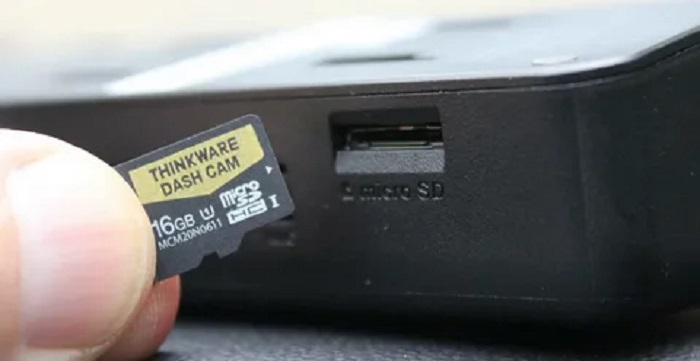
A dash cam can have excellent image quality, reliable parking mode, and a well-designed app, but none of those features matter much if the camera fails to save the footage you need.
That makes the memory card one of the most important—and frequently overlooked—parts of a dash cam setup.
Dash cams place unusual demands on storage. Unlike a phone or digital camera, which may write files only occasionally, a dash cam can record continuously for hours. Once the card becomes full, loop recording starts overwriting older footage and the process continues again and again.
Choosing a memory card for this workload therefore involves more than simply buying the largest or fastest card available.
Here are the specifications that actually matter.
Why Dash Cams Are Hard on Memory Cards
Most everyday uses of a microSD card involve relatively short periods of writing.
You take photographs, record a video, copy some files, and then the card may remain idle for long periods.
A dash cam works differently.
During a drive, it may write video continuously. When loop recording is enabled, old files are eventually deleted or overwritten so that recording can continue without requiring the driver to manually clear the card.
For someone commuting every day, this process can represent many hours of repeated writing every week.
Add a rear camera or parking recording and the workload can become even greater.
This is why the cheapest general-purpose memory card is not necessarily the best choice for a dash cam.
High-Endurance Cards Are Designed for Repeated Writing
One of the first specifications to look for is endurance.
Manufacturers offer microSD product lines intended for workloads involving repeated video recording. Depending on the manufacturer, these may be described using terms such as:
- High Endurance
- Max Endurance
- Pro Endurance
- Surveillance
- Continuous recording
The terminology varies, so the manufacturer’s documentation matters.
The important distinction is that these products are intended for workloads involving much more frequent writing than ordinary removable storage.
That makes endurance a more meaningful dash cam specification than simply comparing headline read speeds.
Speed Still Matters
Endurance is important, but the card also needs to write video fast enough for the camera.
Memory cards use several performance classifications.
You may see markings such as:
Class 10
U1 or U3
V10, V30, V60, or V90
These ratings describe different aspects or minimum levels of write performance under defined standards.
For dash cams recording high-resolution video, particularly 4K or multiple channels, the camera manufacturer may specify a minimum card class.
Follow that requirement.
Buying below the required specification can create recording problems, while buying an extremely expensive card far beyond what the camera supports may provide little practical benefit.
For many current high-resolution dash cam applications, U3/V30 is a common specification to encounter, but compatibility should always be checked for the specific camera rather than treated as a universal rule.
Capacity Determines How Much History You Keep
Storage capacity affects how much video remains available before loop recording needs to overwrite the oldest ordinary footage.
Consider two otherwise identical dash cams.
One uses a relatively small card and the other uses a much larger compatible card.
Both can record continuously, but the larger card generally provides a longer historical recording window before old footage cycles out.
This can be useful if you do not realize immediately that a particular event needs to be saved.
However, capacity has an important limitation:
your dash cam must support it.
A 512GB card provides no benefit if the camera officially supports only 256GB.
Always verify the maximum supported capacity in the dash cam manufacturer’s current documentation.
Resolution Has a Major Effect on Storage
Higher-resolution footage generally requires more storage.
A 4K recording typically generates substantially more data than a lower-resolution recording under otherwise comparable settings.
But resolution is not the only variable.
Storage consumption can also depend on:
- bitrate,
- frame rate,
- codec,
- audio recording,
- number of camera channels,
- and manufacturer encoding settings.
This is why generic claims such as “128GB stores exactly X hours” should be treated cautiously unless they apply to a specific camera and recording configuration.
The same card can provide very different recording durations in different dash cams.
Multiple Cameras Increase the Workload
Modern dash cams are available in several configurations.
A single-channel system records one view, usually the road ahead.
A dual-channel system commonly records front and rear simultaneously.
Three- and four-channel systems may add cabin or additional exterior views.
More channels mean more video streams being written.
That can significantly increase storage consumption.
A capacity that feels generous for a single 1080p camera may provide a much shorter recording window in a system simultaneously capturing several high-resolution feeds.
RoadLens’ own dash-cam guides make the same distinction: its comparison pages note that most dual-channel systems store front and rear footage on the same card, while multi-camera systems can consume substantially more storage.
For this reason, storage planning should happen after deciding how many channels the dash cam will record.
4K Makes Card Selection More Important
High-resolution dash cams can preserve more image detail, but they also create larger files.
A 4K front camera combined with a rear camera may write considerably more data than a basic single-channel 1080p unit.
The card therefore needs to satisfy two different requirements:
sufficient write performance and sufficient endurance.
Capacity then determines how long recordings remain available before loop recording cycles through them.
If you are comparing storage options for a high-resolution camera, a dedicated best micro sd card for dash cam guide can help narrow the specifications that matter, particularly endurance rating, U3/V30-class performance, capacity, and camera compatibility.
The goal is not to find the microSD card with the largest number printed on the package. It is to find a card appropriate for continuous recording and supported by the camera.
How Loop Recording Uses the Card
Loop recording allows a dash cam to continue recording after the memory card fills up.
Rather than stopping completely, the camera divides footage into shorter video files.
When available storage is exhausted, the oldest ordinary recordings can be overwritten by new recordings.
This creates a rolling window of recent footage.
Important clips may be protected separately when the driver manually saves them or when an event-detection system identifies an incident.
RoadLens explains this process in its loop-recording guide: ordinary unlocked footage is designed to be overwritten, while protected clips can be excluded from the normal cycle.
The constant write-delete-write cycle is another reason endurance matters.
Parking Mode Changes the Storage Equation
Parking mode can increase recording activity beyond normal driving hours.
Exactly how much depends on the implementation.
A camera might use:
motion-triggered recording
impact-triggered recording
time-lapse recording
buffered recording
or another manufacturer-specific system.
A camera recording only selected parking events may use storage differently from one recording continuously or using time-lapse for extended periods.
Drivers who rely heavily on parking monitoring should therefore consider storage capacity alongside the power requirements of parking mode.
A larger compatible card can provide additional recording headroom, but it does not solve the power requirements of keeping a dash cam operating while the vehicle is off.
Formatting Is Part of Storage Maintenance
Even a suitable memory card benefits from proper maintenance.
Many dash cam manufacturers recommend periodically formatting the memory card using the camera’s own formatting function.
Formatting can help maintain the file system used by the device and clear accumulated files.
The appropriate schedule depends on the camera and manufacturer’s instructions.
If a camera begins reporting storage errors, formatting may be one troubleshooting step.
However, recurring errors can indicate that the card is incompatible, worn, damaged, or otherwise unsuitable for the workload.
RoadLens’ troubleshooting guidance identifies a worn, full, or incompatible SD card as one of the first things to investigate when a dash cam stops recording correctly.
A Bigger Card Is Not Always Better
Suppose one card has a capacity of 128GB and another offers 1TB.
It might seem obvious that the 1TB card is superior.
Not necessarily.
If the dash cam supports only cards up to 256GB, the larger card may not be compatible.
Likewise, capacity does not tell you whether the card has the endurance characteristics needed for continuous video recording.
Evaluate storage in this order:
Compatibility → endurance → required write performance → capacity.
That sequence is more useful than simply sorting products by storage size.
Avoid Choosing by Read Speed Alone
Memory card packaging often highlights very high transfer speeds.
Those numbers can be useful when moving large files to another device, but a dash cam’s primary requirement is reliable continuous writing.
That distinction matters.
A card marketed around fast read speeds is not automatically the best choice for a camera constantly recording video.
Look at the performance requirements specified by the dash cam manufacturer and the relevant write-speed classification of the card.
Check the Manufacturer’s Approved or Recommended Cards
Some dash cam manufacturers publish compatibility lists or recommend particular memory-card product families.
These recommendations deserve attention.
Dash cams can differ in:
- controller behavior,
- supported capacity,
- file system,
- bitrate,
- number of channels,
- firmware,
- and recording modes.
A card that performs correctly in one camera is not guaranteed to be ideal for every other model.
When an official compatibility list exists, use it as the starting point.
Do Not Ignore Operating Conditions
Dash cams live in a difficult environment.
A camera mounted near a windshield can experience significant temperature changes, particularly when a vehicle is parked outdoors.
The memory card experiences those conditions too.
When comparing cards, check the manufacturer’s specified operating temperature and intended use.
A card designed specifically for continuous camera or surveillance applications may provide specifications relevant to these environments.
Again, manufacturer documentation is more useful than assumptions based on price or branding.
How to Choose the Right Capacity
There is no universal capacity that is perfect for every dash cam.
Instead, consider four factors.
1. Camera resolution
Higher-resolution video generally consumes more storage.
2. Number of channels
Front-and-rear or multi-camera systems write more video than single-channel cameras.
3. How much recording history you want
A larger card can extend the time before ordinary footage is overwritten.
4. Maximum supported capacity
Never ignore the camera manufacturer’s compatibility limit.
For a simple single-channel setup, a moderate-capacity card may be sufficient.
For high-resolution dual- or multi-channel recording, a larger compatible high-endurance card can make more sense.
Warning Signs That a Card May Need Attention
Storage problems should not be ignored because a dash cam can appear to be working even when recording is unreliable.
Potential warning signs include:
- repeated card errors,
- recording unexpectedly stopping,
- missing video segments,
- corrupted files,
- repeated requests to format the card,
- unusually frequent recording restarts,
- or the camera no longer recognizing the card.
These symptoms do not automatically prove that the memory card has failed. Firmware, power, settings, or the camera itself can also cause recording problems.
But the storage system should be one of the first things checked.
Keep Important Footage Somewhere Else
A dash cam memory card should not be treated as permanent archival storage.
Loop recording is specifically designed to overwrite older ordinary footage.
If a recording matters, copy it to another storage location as soon as practical.
That could mean transferring the file to:
- a computer,
- phone,
- external drive,
- or another appropriate backup location.
Keeping important footage only on the dash cam card leaves it exposed to accidental deletion, overwriting, card failure, loss, or damage.
A Practical Memory Card Checklist
Before purchasing a card for a dash cam, check:
Is the card capacity officially supported by the camera?
Is it intended for high-endurance or continuous recording?
Does it meet the required write-speed class?
Is it appropriate for the resolution being recorded?
How many camera channels will be writing to it?
Will parking mode increase recording time?
Does the manufacturer recommend particular card models?
Are its operating conditions suitable for automotive use?
Answering those questions is more useful than buying solely by brand, price, or advertised maximum speed.
Storage Reliability Is Part of Dash Cam Reliability
Drivers naturally spend more time comparing cameras than memory cards.
That makes sense: the camera determines the view, resolution, features, and overall recording system.
But the storage device is where the resulting footage ultimately has to be written.
A poorly matched card can undermine an otherwise capable dash cam.
The practical approach is simple:
choose a compatible high-endurance card, meet the manufacturer’s required write-speed specification, select enough capacity for your recording configuration, maintain it according to the camera manufacturer’s instructions, and back up important footage promptly.
A memory card may be one of the smallest components in a dash cam installation, but it plays one of the largest roles in ensuring that footage is actually there when you need it.