

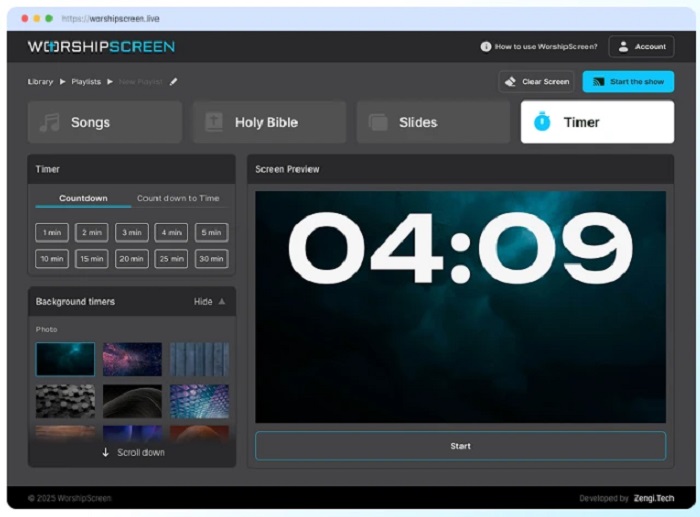
Modern church services often combine worship songs, Bible readings, sermons, announcements, photos, videos, and countdowns. Managing all these elements can become difficult when a church relies on several separate programs. WorshipScreen offers a simple alternative: a browser-based church presentation platform that brings the main visual elements of a service into one workspace.
WorshipScreen is designed for displaying song lyrics, Bible passages, sermon-related content, images, videos, and timers on a projector, television, or LED screen. It requires no desktop software installation and is presented as free to use, with optional donations supporting further development. For churches looking for free worship software, WorshipScreen can function as a complete visual presentation workspace rather than a tool limited to song lyrics.
What Is WorshipScreen?
WorshipScreen is church presentation software built around a practical workflow: prepare content, organize it for a service, connect the display, and control what the congregation sees. Its main sections are Songs, Bible, Slides, and Timer.
The Songs section lets a church create its own reusable library. Lyrics can be added, edited, divided into presentation slides, and reused in future services. This means a worship team does not have to rebuild the same songs every week.
The Bible section is designed for Scripture used during worship and preaching. Passages can be prepared in advance, arranged in the expected order, and displayed verse by verse. If a pastor refers to another passage during the sermon, additional Scripture can be added while the presentation is running.
The Slides section handles content beyond lyrics and Bible verses. Churches can display announcements, photos, videos, and sermon materials. The Timer section provides a countdown before the service or between scheduled parts of the program.
Why a Free Church Presentation Tool Is Useful
A church does not necessarily need a complex production system to provide clear visual support. Small congregations may have one volunteer operating the presentation, while larger churches may have a media team. In both cases, unnecessary technical complexity can increase preparation time.
WorshipScreen keeps the core workflow in one browser-based environment. A team can build a song library, create a playlist for each service, prepare Scripture, add media, select backgrounds, and control the display.
For churches using a computer, the presentation can be sent to a projector, TV, or LED screen. A compatible television can also open the presentation directly in its browser. The control interface can be used from a computer, smartphone, or tablet, which can be helpful when the operator needs to work from another part of the room.
How to Use WorshipScreen for a Church Service
1. Create an Account and Set the Visual Style
Start by creating an account and opening the WorshipScreen dashboard. Before preparing a large amount of content, set the basic visual style.
The platform provides controls for font, text color, alignment, positioning, and the default background. These settings help create a consistent presentation without formatting every slide separately.
Readability should come before decoration. Lyrics must be visible from the back of the church and should have sufficient contrast with the background. A default background, such as a church logo or simple welcome image, is also useful when no active content is being displayed.
2. Build a Reusable Song Library
Add the songs used by the worship team to the song collection. Enter the title and lyrics, then save each song for future services.
WorshipScreen can automatically generate slides from a block of lyrics. However, every song should still be reviewed manually. Musical phrases need to break naturally, and the slide sequence should match the actual arrangement.
For example, a worship leader may repeat a chorus, skip a verse, or return to a bridge. The presentation should reflect what will really be performed. Keeping the amount of text on each slide manageable also makes it easier for the congregation to follow.
3. Create a Service Playlist
A playlist is the main preparation unit for a particular service. It can bring together songs, Bible passages, slides, media, and a timer.
Create a clear name for every service, such as a Sunday service, youth meeting, Christmas service, Easter service, or prayer meeting. Then add the songs in performance order, prepare known Scripture references, upload announcements and videos, and configure the presentation.
The playlist should be treated as a prepared foundation, not as an inflexible script. Church services can change, so the operator needs both preparation and the ability to react.
4. Prepare Bible Passages for the Sermon
If sermon notes are available before the service, prepare the expected Bible references in advance. This prevents the operator from searching for Scripture while the pastor is already speaking.
WorshipScreen allows Bible passages to be added using the selected translation. Prepared verses can be moved through during the sermon, while additional passages can be added if the speaker changes direction.
The operator should always confirm the reference before displaying it. A correct passage shown a few seconds later is more useful than an incorrect verse shown immediately.
5. Add Announcements, Photos, and Videos
Church presentations often include more than worship and preaching. Announcements about events, conferences, community activities, children’s programs, or mission projects can be prepared as slides.
Photos and videos can also be included in the service workflow. For online video, test playback before the service because Internet-dependent content can behave differently under real conditions.
Keeping these materials in the same presentation environment reduces the need to switch between multiple programs during the service.
Connecting WorshipScreen to a Church Display
There are several practical ways to connect WorshipScreen to the congregation’s screen.
The traditional method is to connect a laptop to a projector, TV, or LED display using HDMI. Extended display mode is useful because the operator can keep the controls on the laptop while the congregation sees only the presentation.
A compatible smart TV can also open the presentation directly in its browser. In this arrangement, the TV functions as the output while the laptop or another device remains the controller.
Because WorshipScreen is browser-based, a smartphone or tablet can also be used for control. This can be convenient for smaller churches or services without a permanent presentation desk.
Whatever setup is chosen, test it before the congregation enters. Confirm that the public screen shows only the presentation and not browser tabs, settings, or control panels.
Using WorshipScreen During Live Worship
Once the service begins, timing becomes the most important task.
For songs, advance to the next lyric slide shortly before the congregation needs it. If the operator changes too late, people may already be singing the next line. If the slide changes too early, they may lose their place.
The same principle applies to Scripture and sermon content. The operator should follow what is happening in the room and anticipate the next visual requirement.
WorshipScreen also supports changes during the live presentation. Songs and Bible passages can be added when circumstances require it, and song lyrics can be corrected without rebuilding the entire presentation.
Clean Transitions Improve the Service
Professional-looking church presentation is not only about putting information on screen. It is also about knowing when to remove it.
When a song ends, the final lyric does not always need to remain visible. Before prayer, announcements, or a sermon, a neutral background or church logo can create a better transition.
The Clear Screen function can return the display to the configured default background. This prevents outdated lyrics or Scripture from remaining on screen while the next part of the service is prepared.
A clean transition also gives the congregation a visual pause and makes the presentation feel intentional.
WorshipScreen for Methodist and Other Church Traditions
Church traditions differ, but many have the same basic presentation needs: worship lyrics, Scripture, announcements, sermon references, images, and videos.
For churches searching for methodist worship software, WorshipScreen can be considered as a browser-based presentation option for displaying hymn or worship lyrics, Bible passages, sermon-related slides, announcements, media, and countdowns. The platform is a general church presentation service rather than software limited to one denomination, so the same workflow can be adapted to Methodist congregations and other Christian traditions.
The approach is useful for volunteer teams with different levels of technical experience. The objective is to make the presentation process understandable and repeatable rather than require every volunteer to master professional production software.
A Simple Weekly WorshipScreen Workflow
After the initial setup, the church can use a repeatable weekly routine:
- Add new songs to the library.
- Create the playlist for the upcoming service.
- Add songs in performance order.
- Prepare Bible passages and sermon references.
- Add announcements, photos, and videos.
- Check backgrounds and text readability.
- Test the complete presentation on the actual display.
- Start the presentation before the service begins.
- Follow the worship leader and speaker during the service.
- Use the default screen during pauses.
- Make live changes only when the service requires them.
This workflow moves most technical decisions into the preparation stage. During worship, the operator can concentrate on timing instead of formatting.
WorshipScreen as a Universal Church Presentation Tool
The main advantage of a universal presentation tool is that different parts of a service can be managed through one workflow. Songs, Scripture, announcements, media, and timers do not have to be treated as completely separate presentation tasks.
For a small church, this can reduce technical overhead. For a larger church, it can provide a straightforward workflow for volunteers who need to prepare weekly services without learning a complicated production environment.
The platform can also grow with a church’s content library. The more songs and reusable media a team prepares, the less time it needs to spend rebuilding the same material.
AI-Assisted Planning and Church Presentation
WorshipScreen should be understood as the presentation environment, while AI tools can be used separately to assist with preparation. For example, an AI assistant can help organize a service outline, prepare an announcement checklist, structure a rehearsal plan, or turn rough notes into a presentation sequence.
However, AI-generated material should always be reviewed by the church team before it is displayed publicly. Lyrics, Bible references, names, dates, event information, and quotations should be checked for accuracy. AI can support preparation, but final responsibility for the content shown to the congregation remains with the people organizing the service.
Conclusion
WorshipScreen is a free, browser-based church presentation solution that brings worship lyrics, Bible passages, slides, videos, images, and timers into one practical workflow. It can work with common church equipment such as projectors, TVs, and LED screens and does not require a desktop software installation.
The most effective approach is to prepare in advance: build a reusable song library, create a playlist for every service, prepare Scripture, check media, choose readable backgrounds, test the display, and review the complete service before people arrive.
At the same time, a useful church presentation system must allow flexibility. Worship leaders may change song arrangements, pastors may reference unexpected Bible passages, and service schedules may shift. WorshipScreen combines advance preparation with live control, allowing the presentation to adapt when the service changes.
For churches seeking a simple and versatile way to organize what the congregation sees during worship and preaching, WorshipScreen provides a practical foundation. It can be used not only for lyrics but as a central visual workspace for the entire church service.